
Customizing your credit note templates allows you to keep your documents visually aligned with your brand identity while ensuring clarity for your clients. In CommBilling, you can easily adjust the layout, colors, and content elements of your credit notes to match your preferred design and communication style.
Important Note:
Credit note customization is available only for C-Business plan users.
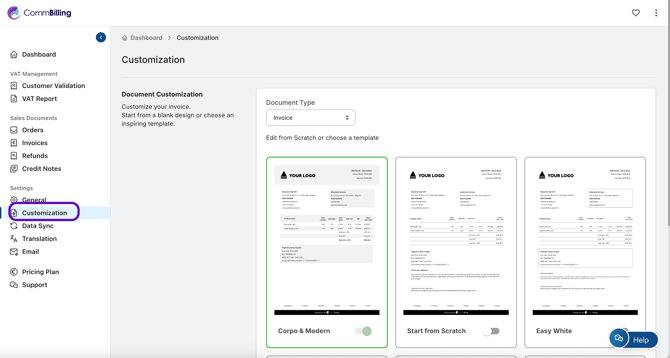
- Step 1: Go to Settings from the main menu and click on the Customization tab.
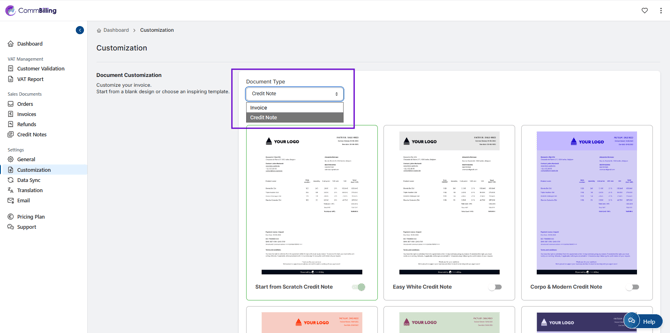
- Step 2: Select Credit Notes in Document Type.
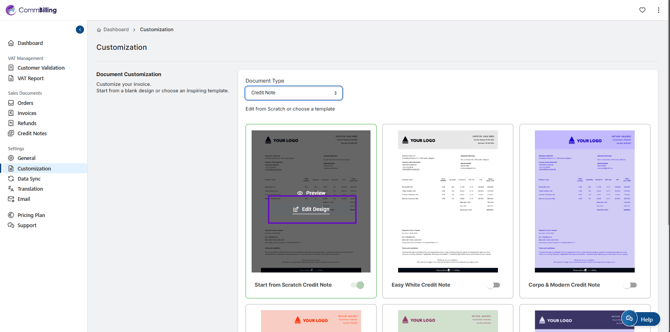
- Step 3: Move your mouse over the template you want, then click 'Edit Design'.
- Step 4: Inside the template, you will find four sections with different customization options. Modify each section as needed, and view the changes in the preview on the left.
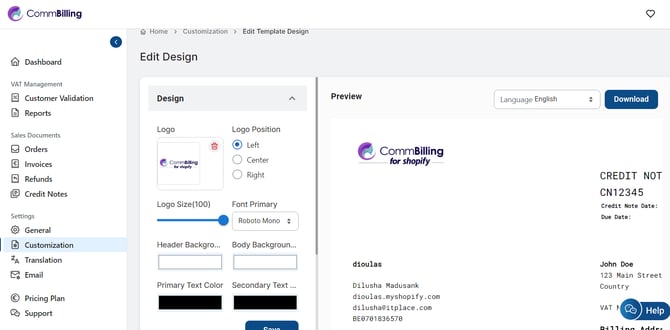
- Step 5: Once you have added the desired customizations, click the Save button to finalize your updates.
Customizing your credit note templates ensures visual harmony with your invoices and enhances the overall client experience. With CommBilling, you have complete flexibility to design professional, branded documents that strengthen your company’s image and credibility.